
When working with documents, you often need to define the position of elements such as text boxes and signature fields. The coordinate system used for this purpose is described below.
PDF documents
The basis for determining positions in PDF documents is the so-called PDF user space. Within this system, a crop box is usually defined, which determines the visible area of the document. If the crop box is not defined, the media box is used instead. According to the PDF standard, the media box must always be defined, and signotec components cannot process PDF documents without it.
When the documentation refers to the “visible reference system” or “visible coordinates,” it always means the coordinate system whose origin is in the top left corner of the visible area - defined by the crop box or, if no crop box is defined, the media box - with the X-axis to the left and the Y-axis down.
For backward compatibility reasons, a second reference system (“underlying coordinates”) is also available. This has the same orientation as the visible coordinate system, but its origin is at the left edge of the PDF user space and at the height of the top edge of the media box. It should no longer be used, if possible. Above all, however, it is important that the same reference system is used throughout. Crop box and media box are often defined in such a way that the two reference systems are identical, which means that errors caused by the use of different reference systems only occur sporadically and are not immediately noticeable.
For positioning elements in the document, a rectangle is defined in the reference system. This is done either via the position of the two opposite corner points at the top left (“left" “top”) and bottom right (“right", “bottom”), or via the top left corner point and the width and height of the element. The X coordinate of a point always corresponds to the distance from the left edge of the reference system used, and the Y coordinate corresponds to the distance from the top edge.
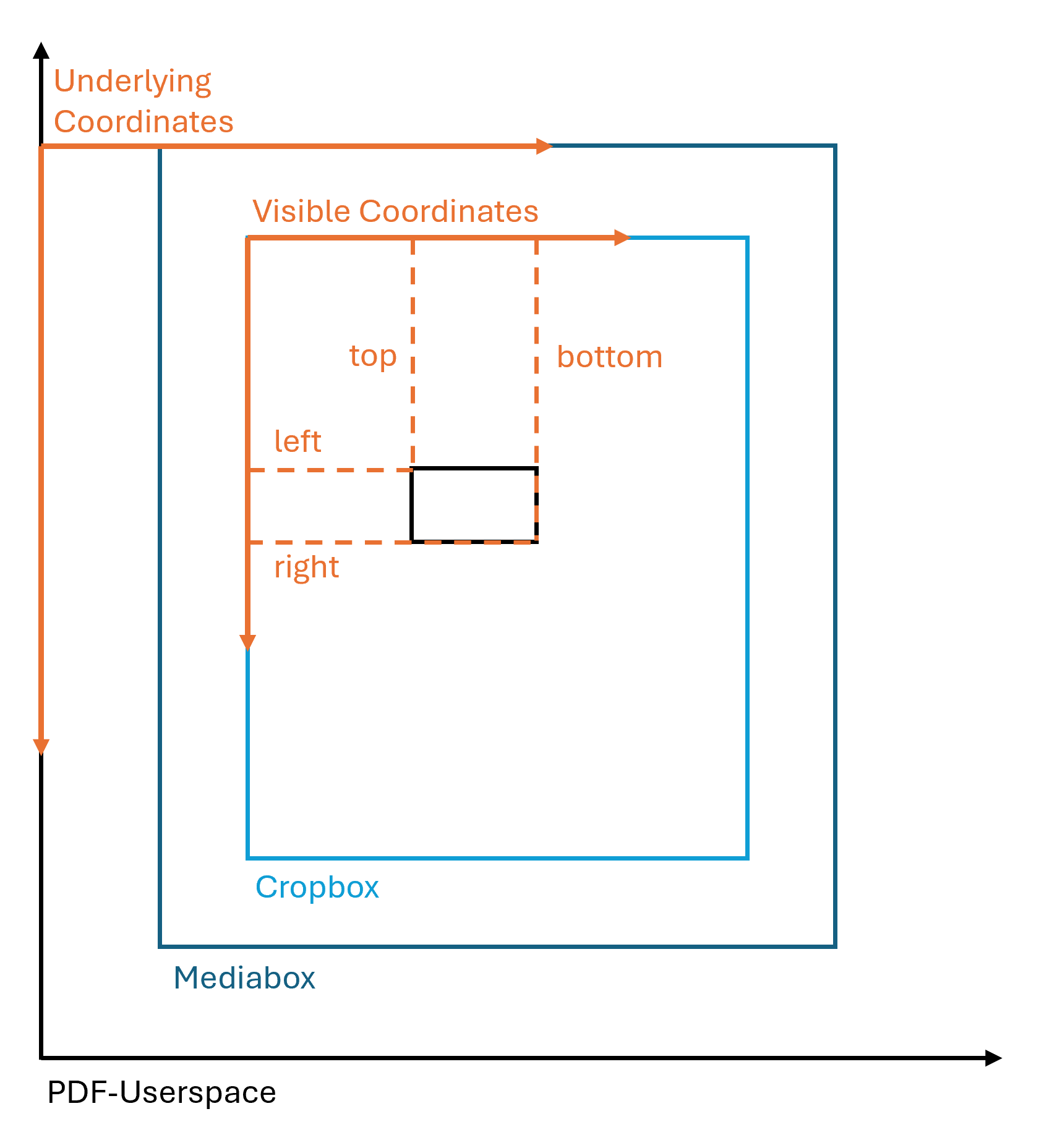
The coordinates and lengths are always specified in points, unless explicitly stated otherwise in the documentation.
Image documents
In image documents, the entire image area is interpreted as visible. The coordinate system used to determine positions in image documents originates in the top left corner, with the X-axis to the left and the Y-axis downward. When image documents are worked with, the option parameters passed to the methods that specify the coordinate system used have no effect.
For positioning elements in the document, a rectangle is defined in the reference system. This is done either via the position of the two opposite corner points at the top left (“left" “top”) and bottom right (“right", “bottom”), or via the top left corner point and the width and height of the element. The X coordinate of a point always corresponds to the distance from the left edge of the image, and the Y coordinate corresponds to the distance from the top edge.

Pixels are used as the unit for coordinates and lengths.